Last Updated on September 1, 2026 by Umar Farooq
The fan is turning. Air is moving. The display looks perfectly happy. And the bucket has been bone dry for two days.
If that’s what you’re looking at, the first thing worth knowing is that your dehumidifier is probably not broken. Not yet, anyway. A fan running without a compressor is normal behaviour a surprising amount of the time, and the single most expensive mistake people make with this fault is buying a part before they’ve spent ten minutes ruling out the free explanations.
The second thing worth knowing is that the noise your machine makes — or refuses to make — will tell you almost exactly what’s wrong. More on that shortly.
The 30-second answer
Before anything else, go and do these three things:
- Leave it alone for ten minutes and watch. Compressors are not allowed to restart immediately. Every unit has a lockout of roughly three to five minutes after any stop, and if the coil has iced up the machine will deliberately run fan-only until it thaws — which can take a lot longer than three minutes.
- Check what you’ve actually asked it to do. If the room is at 48% and the dial says 50%, the machine is satisfied and has switched the compressor off on purpose. Turn the target down to 35% and see whether it wakes up.
- Check the room temperature. Below about 18°C / 65°F a compressor dehumidifier starts struggling, and it will spend more and more of its time in defrost rather than dehumidifying.
That’s the free half of this job, and it’s the answer more often than the internet would have you believe.
⚠️ Read this before you open anything
Unplug the unit at the wall socket before removing any panel. Switching it off at the control panel leaves the board live.
A dehumidifier contains a capacitor that stores a charge after the plug is out. It does not drain the moment you disconnect it, and touching its terminals will give you a serious shock. Discharging one safely takes the right tool and the knowledge to use it. If you don’t already have both, the inside of the machine is not the place to learn.
The sealed refrigerant circuit is pressurised and, in most countries, illegal to open without a licence. Nothing in this guide asks you to touch it.
Everything up to and including Step 7 can be done with the case closed. That is deliberate.
What’s actually going on inside
Here is the thing that makes this fault make sense:
The fan and the compressor are on two separate circuits. The control board switches each one independently. So the fan running tells you the unit has power, the board is alive, and the fan motor is fine — and it tells you absolutely nothing about the compressor.
On the compressor’s side of the board, the current has to get past four gates before the motor will turn. Any one of them stops it dead, and the symptom looks identical from where you’re standing.

Gate 1 is the one people skip. It shouldn’t be, because it’s the only one that costs nothing to check and it’s the most likely.
Causes, ranked by how common they are
No invented percentages here — nobody publishes service-call data for portable dehumidifiers, and pages that put confident numbers against each cause are making them up. This is ordered by what actually turns up most.
Most common — and not a fault
- The anti-short-cycle delay. Three to five minutes of enforced silence after every stop. It exists because restarting a compressor against a pressurised system is how you kill one; the technique is old enough to be patented.
- Defrost. Ice on the coil, so the board cuts the compressor and runs the fan alone until it clears. GE’s own documentation says exactly this: below 41°F frost forms, and “the compressor will cycle off and the fan will run continuously until the frost disappears.”
- Target humidity already reached. The compressor is off because you told it to be.
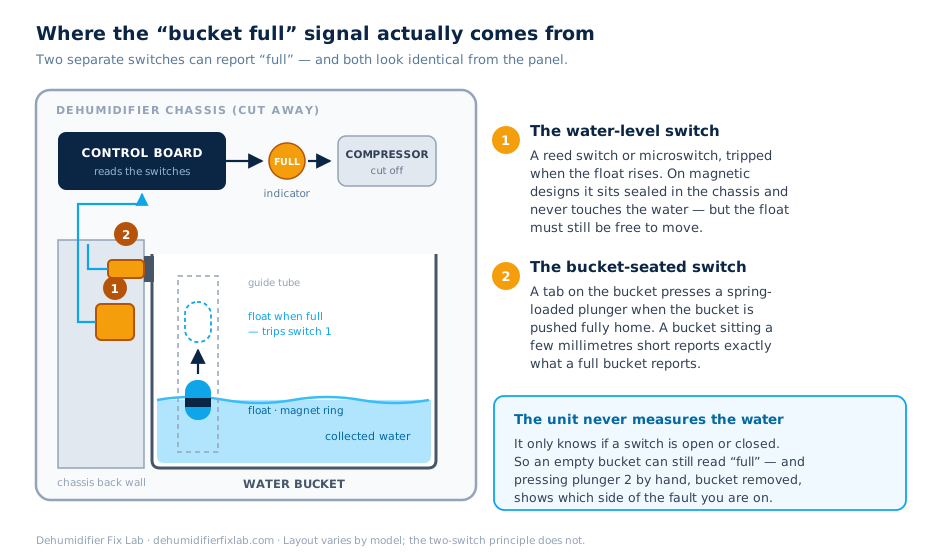
- A false “bucket full” reading. The board cuts the compressor the instant it believes the tank is full, and a stuck float will make it believe that with an empty bucket sitting right there. If the full light is on, stop here and work through why a dehumidifier says the bucket is full when it’s empty instead — that’s a different fault with a different fix.
Common
- Room too cold. Compressor dehumidifiers lose performance fast in a cold room and end up in near-permanent defrost. This isn’t a fault you can fix with a part.
- Overload protector tripping. A thermal switch on the compressor that cuts power when the motor gets too hot, then resets itself once it cools. Usually a symptom of something else — restricted airflow, a filthy coil, a weak start.
- Run capacitor failing. The classic. The motor tries, hums, gives up.
Less common
- Start relay failed. You get a click and then nothing.
- Undersized or long extension cord. Voltage drop under starting load is a genuine, documented cause of repeated overload trips — and it eventually kills the overload.
- Unit was moved on its side and run too soon. Oil ends up where it shouldn’t be.
Rare, and terminal
- Seized compressor or a refrigerant leak. The machine may still try, but it’s finished.
Work through it in this order
Steps 1 to 7 keep the case closed. Stop as soon as you get an answer.
Step 1 — Wait ten minutes, and watch
Plug it in, set the humidity target well below the room’s actual level, and then leave it. Don’t hover over it pressing buttons — every press that stops the unit restarts the lockout timer.
Watch for a defrost indicator, if your unit has one. If it lights, you have your answer: the coil is icy and the machine is thawing it. That’s the design working, not failing.
→ Compressor kicks in within ten minutes? Nothing is wrong. It was the delay.
→ Still silent? Step 2.
Step 2 — Look at the coil
Open the front grille and look at the fins behind the filter. You’re looking for frost or a sheet of ice.
If it’s iced, stop troubleshooting the compressor — you have an icing problem, and the compressor being off is the machine protecting itself. Haier and Frigidaire both document this as expected behaviour in cold conditions rather than a defect. Switch the unit off, let the ice melt completely, and address the temperature or the airflow.
→ Coil clear? Step 3.
Step 3 — Check the room, honestly
Get a thermometer in the room — not the reading on the dehumidifier, which sits in its own warm exhaust and lies to you.
Below 18°C / 65°F a compressor unit is working against physics. Below 5°C / 41°F, by GE’s own numbers, frost forms faster than it can be removed. If your basement or garage sits in that range for months, no part will fix this. A desiccant dehumidifier will work down there; a compressor one won’t.
→ Room comfortably above 18°C? Step 4.
Step 4 — Stand there and listen
This is the step that does the real work, and almost nobody leads with it. Put your ear near the back of the unit at the moment the compressor should engage, and match what you hear:
Nothing at all. Total silence from the compressor end.
The board isn’t calling for it, or the overload is open. Go back and double-check the humidity setting. If that’s definitely right, the overload protector or the board is the suspect.
A single click, then silence.
That’s a relay operating and the motor not following. Start relay is the prime suspect.
A hum or a buzz for two to five seconds, then a clunk and silence — repeating every few minutes.
This is the signature of a compressor trying and failing to start. The motor is drawing locked-rotor current, heating up, and the overload is cutting it out. Nine times out of ten this is the run capacitor. The tenth time it’s a seized compressor, and telling the two apart needs a meter.
It starts, runs for a while, then stops and won’t restart for ages.
It’s starting fine but overheating. Look at airflow and coil cleanliness — Step 5.
A rattle or metallic grinding from the compressor itself.
Internal mechanical damage. Stop here.
Write down which of those you heard. It determines everything that follows.
Step 5 — Airflow and coils
If the compressor starts and then trips out, it’s almost always heat.
- Pull the filter and clean it. A clogged filter starves the coil of air and the whole system runs hot.
- Look at the condenser coil — the second set of fins, behind the cold one. If it’s furred with dust, the heat has nowhere to go. Vacuum it gently with a brush attachment, unplugged.
- Give the unit space. At least 30 cm / 12 inches clear on every side. Shoved into a corner it re-breathes its own hot exhaust.
→ Trips less or stops tripping? That was it. Add the filter to your monthly routine.
Step 6 — Has it been moved recently?
If the unit has been laid on its side or its back — in a car, in a loft, in a delivery van — the compressor oil can migrate out of the sump. Running it in that state starves the bearings.
Stand it fully upright and leave it for 24 hours before switching on. Some manufacturers specify less (Honeywell says four hours on certain models, Whynter as little as two), so check your manual, but 24 hours is the safe default and it costs you nothing but patience.
This one catches people out constantly, and it’s a genuinely recoverable situation — provided you didn’t run it for long.
Step 7 — Take the extension cord out of the equation
Plug the dehumidifier directly into a wall socket. No extension lead, no multi-way adaptor, nothing else on the same outlet.
A compressor’s starting current is many times its running current. A long or thin extension cord drops enough voltage during that inrush that the motor never gets going — and the repeated failed starts are what destroy overload protectors. It’s an unglamorous cause and it is far more common than it deserves to be.
→ Works on a wall socket? You’ve found it. Leave it plugged in directly.
Step 8 — 🛑 This is where it becomes a technician’s job
If you’ve reached here, the remaining candidates are the run capacitor, the start relay, the overload protector, and the compressor itself. All four live inside the case, and getting to them means working around a capacitor that holds a charge.
I’m not going to walk you through discharging one. If you already know how, you don’t need me to; if you don’t, a written guide is not where you should be learning it.
What’s useful for you to know is the shape of the decision:
- Run capacitor, start relay, overload protector — these are small, cheap parts, typically a few pounds or dollars each. For a competent appliance technician it’s a short job. If the machine is otherwise sound, it’s worth doing.
- Compressor or sealed system — it’s over. Not because it can’t technically be done, but because the labour plus the part comfortably exceeds the price of a new unit, on a machine whose other components are all the same age.
When you call someone, tell them exactly what you heard in Step 4. “It hums for three seconds and then clicks off” will save them twenty minutes and you some money.
When it isn’t worth fixing
Be blunt with yourself before spending anything:
- Under three years old, and it hums-and-clicks? Worth diagnosing. A capacitor is a cheap fix and you’d be replacing a nearly-new machine over a part the size of a film canister.
- Six or more years old, and it needs a compressor? Replace it. The general appliance rule — don’t spend more than about half the price of a new one — kills this repair comfortably.
- Still under warranty? Don’t open the case at all. You’ll void it. Ring the manufacturer with your Step 4 description.
- Living permanently in a cold space? The problem isn’t the machine, it’s the match between machine and room. Replacing like with like just buys you the same fault again.
Making it less likely next time
- Clean the filter monthly during the season. It’s the single cheapest thing standing between you and an overheating compressor.
- Vacuum the coils once a season. Unplugged, gentle brush.
- Give it 30 cm of clear air on every side.
- Plug it straight into the wall. Permanently.
- Never restart it repeatedly when it won’t start. Each failed attempt heats the windings further. If it won’t go after two tries, stop and diagnose.
- Transport it upright, and if you can’t, let it stand a day before switching on.
Frequently asked questions
Is it normal for the fan to run when the compressor is off?
Yes, frequently. It happens during the three-to-five-minute restart lockout, throughout any defrost cycle, and whenever the room has reached the humidity you set. Fan-only operation is a normal state, not automatically a fault.
How long should I wait before deciding something is wrong?
Ten minutes covers the restart delay with room to spare. A defrost cycle can run considerably longer — if the coil was properly iced, give it an hour with the unit off and the ice fully melted before you judge.
My dehumidifier hums but won’t start. What is that?
The motor is trying to turn and can’t. That’s the classic failed-run-capacitor signature, though a mechanically seized compressor produces the same sound. Don’t keep switching it on and off to test it — each attempt puts locked-rotor current through the windings.
Can I replace the capacitor myself?
Only if you already know how to discharge one safely and can identify the correct replacement by capacitance and voltage rating. It is a genuinely cheap part and a short job for someone with the right skills. It is also a real shock risk for someone without them, and this is not a case where having a go is a reasonable way to find out.
The compressor runs but the bucket is still empty. Same problem?
No — different fault, and you’re in luck, because that means the compressor circuit is fine. Look at the coil temperature, the airflow, and the room conditions instead.
Why does mine only do this in winter?
Because it’s a compressor dehumidifier in a cold room. Below roughly 18°C it spends more of its life defrosting than dehumidifying, and below 5°C it barely dehumidifies at all. That’s the technology, not the unit — a desiccant model is the answer for unheated spaces.
Related guide: Dehumidifier says the bucket is full when it’s empty — the other reason a control board refuses to run the compressor.
Sources
- GE Appliances — Dehumidifier: Compressor Not Operating — the 41°F frost threshold, and confirmation that the compressor cycles off while the fan keeps running during defrost.
- Haier — Dehumidifier Frost or Ice on Coils — icing as expected behaviour in cold conditions.
- Frigidaire — Dehumidifier Frost Buildup — the same, from a second manufacturer.
- US Patent 5,524,448 — Minimum off-time device for protecting refrigeration compressors after a power interruption — why the enforced restart delay exists.
Where this guide and your appliance’s own manual disagree, follow the manual.